


Quick Spring Mobile 1.0 Tutorial
This is a quick tutorial on Spring Mobile 1.0. You will need Eclipse with m2e to follow the steps below.1. In Eclipse, create a new Maven Project using the spring-mvc-jpa-archetype.


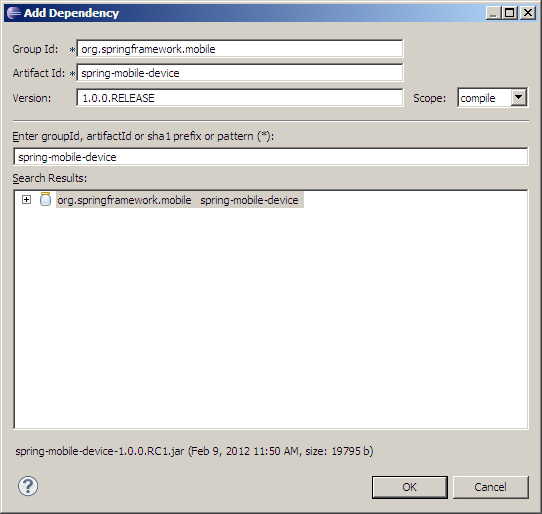
2. Add the spring-mobile-device dependency to pom.xml.
<dependency>
<groupId>org.springframework.mobile</groupId>
<artifactId>spring-mobile-device</artifactId>
<version>1.0.0.RELEASE</version>
</dependency>
Also add the java servlet API, which we will be used to import HttpServletRequest in the unit test later.
<dependency>Spring Mobile needs Spring MVC 3.1, so change
<groupId>javax.servlet</groupId>
<artifactId>servlet-api</artifactId>
<version>2.5</version>
<scope>provided</scope>
</dependency>
<spring.version>3.0.5.RELEASE</spring.version>to
<spring.version>3.1.1.RELEASE</spring.version>3. Add the following Spring Mobile interceptors in servlet-context.xml.
<interceptors>These 3 interceptors enable device resolution, site preferences, and site switching, respectively. Device resolution tells you if the user is mobile or not. Site preferences gives the user the ability to switch between mobile or desktop. Site switching gives you the ability to redirect users to a dedicated mobile site.
<!-- Resolve the device that originated the web request -->
<beans:bean class="org.springframework.mobile.device.DeviceResolverHandlerInterceptor" />
<!-- Manage the user's site preference -->
<beans:bean class="org.springframework.mobile.device.site.SitePreferenceHandlerInterceptor" />
<!-- Redirects mobile users to domain.com/quickspringmobile/spring/m/ -->
<beans:bean class="org.springframework.mobile.device.switcher.SiteSwitcherHandlerInterceptor" factory-method="urlPath">
<beans:constructor-arg value="/m" />
<beans:constructor-arg value="/quickspringmobile/spring" />
</beans:bean>
</interceptors>
4. The resolved device is available under the currentDevice request attribute. The site preference is available under the currentSitePreference request attribute.
You can pass the current Device to your @Controller methods by configuring DeviceWebArgumentResolver. You can also pass the current SitePreference by configuring SitePreferenceWebArgumentResolver.
<annotation-driven>5. While still in servlet-context.xml change spring-mvc-3.0.xsd to spring-mvc-3.1.xsd. You can change all XSDs to use version 3.1, but that is not required to run our example.<argument-resolvers> <beans:bean class="org.springframework.mobile.device.DeviceWebArgumentResolver" /> <beans:bean class="org.springframework.mobile.device.site.SitePreferenceWebArgumentResolver" /> </argument-resolvers> </annotation-driven>
6. In HomeController, change the home method from
public String home(Model model) {to
public String home(Model model, Device device, SitePreference sitePreference) {Then change the String
"This is the message from the controller!"to
"deviceIsMobile= " + device.isMobile() + " prefersMobile=" + (sitePreference == SitePreference.MOBILE)The add the necessary import statements.
import org.springframework.mobile.device.Device;Add the controller method for handling mobile requests. This just adds an extra log and calls the same home controller method.
import org.springframework.mobile.device.site.SitePreference;
@RequestMapping(value = "/m/", method = RequestMethod.GET)7. Change the following line in HomeControllerTest from
public String mobile(Model model, Device device, SitePreference sitePreference) {
logger.info("Welcome mobile!");
return home(model, device, sitePreference);
}
Assert.assertEquals("home", controller.home(model));to
HttpServletRequest request = new MockHttpServletRequest();This will make your unit test class compile. Then add the necessary import statements.
Device device = DeviceUtils.getCurrentDevice(request);
Assert.assertEquals("home", controller.home(model, device, SitePreference.MOBILE));
import org.springframework.mobile.device.Device;8. For site preferences, add the following before the end body tag in home.jsp.
import org.springframework.mobile.device.DeviceUtils;
import org.springframework.mobile.device.site.SitePreference;
import org.springframework.mock.web.MockHttpServletRequest;
<br />Site: <a href="?site_preference=normal">Normal</a> | <a href="?site_preference=mobile">Mobile</a>9. To enable logging, edit log4j.xml, and change
<logger name="org.application">to
<logger name="com.teamextension">10. Run mvn tomcat:run and visit http://localhost:8080/quickspringmobile to see your project in action.
Project source is also available for download.
For more information, please read the Spring Mobile Reference Manual.


